VST3 Plugin for Windows

Your mix's
low end,
explained.

Low-End Control analyses your audio, detects exactly what is wrong in the sub and low-mid range, and tells you — in plain language — what to fix and why.

Format VST3
Platform Windows 64-bit
Version 1.4.6
Latency 0 samples
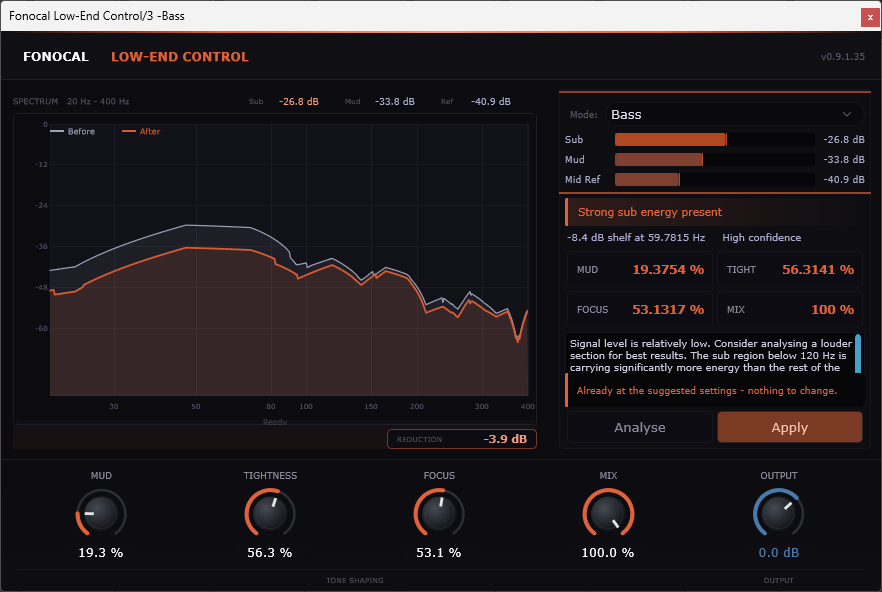
Fonocal Low-End Control — plugin interface

Low-end is the hardest part
of any mix

It takes time you don't have

Manually sweeping EQ bands looking for mud or boom can take 20 minutes on a single track. On a full mix it takes longer.

Ear fatigue makes it unreliable

After an hour of mixing, your perception of low frequencies shifts. What sounded right at the start often doesn't translate.

Standard analysers show data, not answers

A spectrum analyser tells you where energy is. It doesn't tell you whether that's a problem, how much to cut, or why.

Low-End Control does the listening for you

It measures the sub, mud, and reference bands, detects what's wrong, calculates how much correction is needed, and explains it in plain English — all in under two seconds.

1
Play your track for two seconds
2
Press Analyse — the plugin reads the low end
3
Read the plain-language explanation
4
Press Apply — corrections are set instantly

Three systems,
one workflow

01 / ANALYSE

2-second analysis engine

Accumulates a rolling window of audio and measures energy across three bands: Sub (30–120 Hz), Mud (150–350 Hz), and a mid reference (400–800 Hz). Detects five distinct low-end conditions with confidence scoring.

02 / EXPLAIN

Plain-language explanations

Every result comes with a human-readable explanation — not parameter values, but a description of what you will hear. Wording adapts to confidence level so you always know how certain the diagnosis is.

03 / APPLY

One-click correction

Suggested Mud, Tightness, Focus, and Mix values are calculated from the analysis. Review them, then press Apply to set them instantly. A result summary then tells you what changed and why it helps.

04 / MODES

Four target modes

Mix Bus, Bass, Kick, and Drums modes tune the analysis heuristics for the source material. The same energy levels that indicate a problem on a mix bus are perfectly normal on a solo kick drum.

05 / DSP

Transparent processing

Peaking EQ at 250 Hz for mud correction, low shelf at 80 Hz for sub control, and a parallel dry/wet Mix control so you can blend as much correction as the track needs. Zero latency.

06 / FORMAT

VST3 · Windows · Zero latency

Works in any 64-bit DAW that supports VST3: Cubase, Ableton Live, Studio One, Reaper, FL Studio, and more. No iLok, no internet connection required after activation.

From problem to fixed
in four steps

Play

Insert the plugin and play your track. The analysis engine listens continuously in the background.

Analyse

Press Analyse. The plugin processes two seconds of audio and detects the low-end condition.

Read

The condition strip, explanation text, and suggested values appear. No guesswork required.

Apply

Press Apply. Corrections are set. A result summary describes what changed and what to expect.

One price.
Yours forever.

No subscription. No iLok. No machine limit. Pay once and use it in every project on your system.

Fonocal — Full Licence
Low-End Control
Perpetual licence · VST3 for Windows
$ 29 $59
INTRO PRICE — ENDS MAY 31ST
Full VST3 plugin — Windows 10 & 11
Perpetual licence — no subscription
All future updates included
User Guide PDF included
Email support at fonocal.com
Installer & licence key delivered instantly by email
Buy now — $29 intro price · secure checkout

Secure payment · Instant delivery · 30-day money-back guarantee

What you need

Operating System
Windows 10 or 11 (64-bit)
Plugin Format
VST3
Architecture
64-bit only
DAW Compatibility
Any VST3 host — Cubase, Ableton Live, Studio One, Reaper, FL Studio & more
Internet
Required for first activation only
Copy Protection
Licence key — no iLok required