Spectral Sidechain
Duck the overlap, not the whole bass.
Spectral Sidechain listens to the trigger, usually the kick, and lowers only the frequencies it actually occupies in the target, inside a range you choose. The kick cuts through. The bass stays full. Nothing pumps.
- Windows: VST3
- macOS: VST3 and AU, Apple Silicon native
- 30-day money-back guarantee
- Free updates for life
Classic sidechain versus spectral
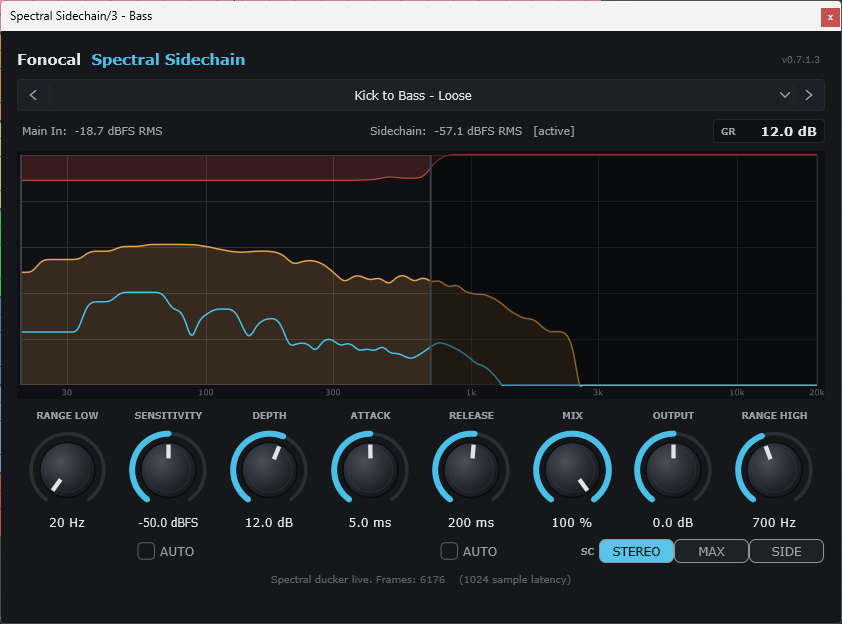
A compressor on the bass keyed from the kick turns the entire bass down on every hit, harmonics included. That is the pumping you are trying to hide. Spectral Sidechain measures the kick’s spectrum in real time and reduces the bass only where the two overlap.
Where it earns its place
Kick into bass
The classic case. The kick carves its own pocket in the low end without ducking the bass’s upper harmonics.
Vocal into a bed
Key it from the vocal and put it on pads, sustained synths or rhythm parts. The bed steps back only where the vocal sits.
De-essing by sidechain
Set a high active range so only sibilant frequencies are reduced when the trigger hits.
Mix glue
Light, full-range ducking that follows the energy of a reference signal.
Creative pumping
Push Depth and widen the range when you want the pump to be the sound.
Any two elements that fight
Lead over chords, snare over a wide synth, bass over a sub layer. If two sounds share frequencies, this is the tool.
Every control, and what it does
Eight knobs, two auto modes, three sidechain modes, and a before/after spectrum with a per-frequency reduction curve so you can see exactly what is being ducked.
Stereo trigger handling
Three SC modes decide how a stereo trigger drives the ducking. Stereo averages left and right, the normal choice. Max follows whichever channel is louder at each instant, more aggressive on wide, layered kicks. Side reacts only to the stereo difference, so a centred mono trigger produces no ducking at all.
What the display shows
The amber curve is your track going in, the cyan line is what comes out, and the red overlay shows how much is being reduced at every frequency. The active range edges are marked and everything outside them is dimmed. Presets such as Kick to Bass get you close; save your own from the same menu.
What you get
| Formats | Windows: VST3. macOS: VST3 and Audio Unit (AU). |
|---|---|
| System requirements | Windows 10 or 11, 64-bit. macOS 11 Big Sur or later, universal binary: native on Apple Silicon (M1 to M4, no Rosetta) and on Intel. |
| Current version | 1.0.7 |
| Latency | 1024 samples, reported to the host so your DAW compensates automatically. The Mix dry path is latency-matched. |
| Updates | Free for the lifetime of the plugin. Run the new installer; your activation carries over. |
| Copy protection | Licence key by email. No iLok, no dongle. The plugin sends no telemetry; its only network call is to Fonocal’s licence server during activation. |
| Licence | Perpetual. One purchase, up to 3 machines. Personal and commercial use. |
| Activation | Internet connection needed once to activate. Works offline afterwards. Device slots are managed in the account portal. |
| Delivery | Licence key by email after checkout. Installers and the user guide are on the Downloads page. |
| Price | $39 one-time, secure checkout by FastSpring |
| Refunds | Full refund within 30 days of purchase, for any reason. |
| Support | support@fonocal.com, replies within 3 business days. |
Questions
How do I send the kick into the plugin?
Put Spectral Sidechain on the bass track, then on the kick track add a send to the plugin’s side-chain input at 0 dB, the same routing you would use for any sidechain compressor. Load the Kick to Bass preset and play.
Does it add latency?
Yes, 1024 samples, reported to the host so your DAW compensates automatically. It is designed for mixing rather than live tracking.
Nothing is ducking. What should I check?
Confirm the trigger actually reaches the sidechain input, that Depth is not at 0, and that Sensitivity is not so high the trigger never crosses it. If you are in Side mode with a mono kick, switch to Stereo: Side reacts only to stereo difference, by design.
Does it use samples or replace the bass?
No. It is an audio effect. It only reduces level in the target signal where the trigger is present.
Which DAWs work?
Any VST3 host on Windows or macOS, and any AU host on macOS: Cubase, Ableton Live, Logic Pro, Studio One, REAPER, FL Studio, Bitwig and GarageBand. Pro Tools (AAX) is not supported.
Where do I download the installer?
Installers and the user guide are on the Downloads page. Your licence key arrives by email after purchase.
Kick and bass that finally lock together.
Spectral Sidechain, $39 one-time. VST3 and AU for Windows and macOS. 30 days to decide.